

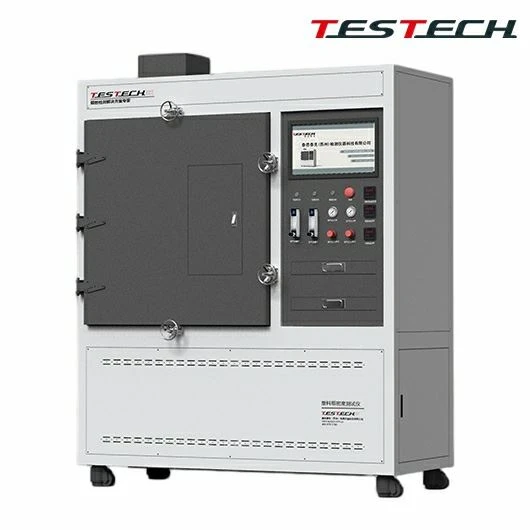
Hey there, thanks for popping in! If you’ve ever ordered a Smoke Density Chamber (shoutout to our product page: /universal-fire-tester/smoke-density-chamber.html) or just dabbled in fire safety testing, you’ve probably wondered: how much data can this thing actually store? I get it—when you’re chasing precise smoke density readings for compliance or R&D, having a reliable tool that doesn’t drop mid-test or run out of space is non-negotiable. As someone who’s been selling these chambers for 8 years, I’ve fielded this question so many times, I figured I’d break it down for you, no fancy jargon, just straight talk.
First off, let’s ground this: a Smoke Density Chamber’s data capacity isn’t a one-size-fits-all number. It depends on two big things—what model you’re using, and how you’re configuring it to run tests. Let’s start with the basics of what these chambers do, because that ties directly to data output. When you run a test (say, for building materials, wiring, or upholstery), the chamber measures smoke density over time, usually tracking parameters like optical density, temperature, oxygen levels, even flue gas composition if you’re pairing it with extra gear. All of that adds up to a ton of data points. For example, a standard test might run for 20, 40, or even 90 minutes, sampling every 1 to 10 seconds. If you do the math, that’s hundreds, if not thousands, of data points per test—plus you might run 10 tests in a day, a week, or a month. That’s where storage comes in.
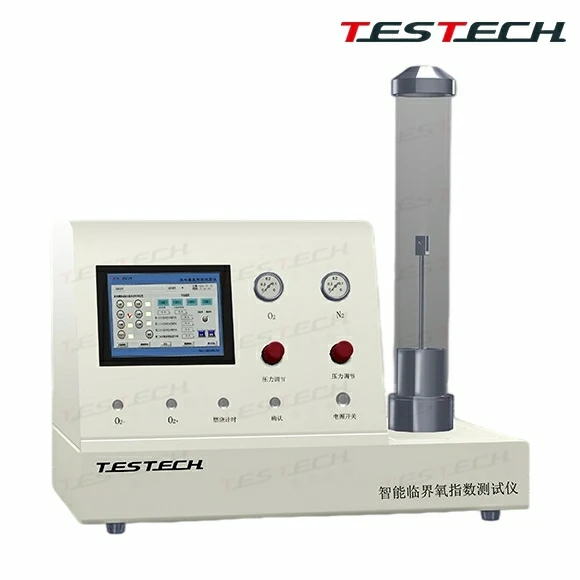
Let’s talk about our chambers specifically, since that’s what I know best. Most entry-level to mid-range Smoke Density Chambers (SDCs) these days have built-in internal storage, usually starting at 8GB. Wait, that might sound like a lot, but let’s put it in perspective: a single test file from our standard SDC, with data every 5 seconds, a 30-minute run, plus metadata (test ID, material type, date, operator) is like 2MB to 5MB. So 8GB would hold roughly 1,600 to 4,000 test files. For a small lab that runs 10 tests a week, that’s over 3 years of storage—no problem. But if you’re a larger facility running 50+ tests a week, or you’re adding extra sensors (like pairing it with a Limited Oxygen Index Tester: /universal-fire-tester/limited-oxygen-index-tester.html to track oxygen alongside smoke, or an Elevated-temperature Oxygen Index Tester: /universal-fire-tester/elevated-temperature-oxygen-index-tester.html for high-heat material testing), your data per test jumps. Those extra parameters add more numbers, so a single test might be 10MB to 20MB. Then 8GB cuts down to 400 to 800 tests—still solid, but you might want to expand.
Which is why all our SDC models let you add external storage or integrate with cloud systems these days. Most newer units have USB ports for plugging in a flash drive (up to 1TB, which would hold tens of thousands of test files) or connecting to a lab network. Some of our industrial-grade SDCs, built for high-volume testing, come with built-in 32GB or 64GB storage plus expandable slots, so you don’t have to worry about running out even if you’re running non-stop 24/7. I remember a customer a couple years ago—they were a big automotive parts manufacturer, testing wiring harnesses all day—swore by our expandable storage. Before they switched, their old chamber would crash mid-month because they filled the internal storage, costing them days of re-testing and delaying production. That’s the kind of headache storage solves.
Wait, but let’s not sleep on how you set up the data sampling rate. If you’re running a quick diagnostic test, you might sample every 10 seconds, which uses less data. If you’re doing a deep dive on a new material, sampling every second for 90 minutes, that’s way more data. We always tell customers: adjust the sampling rate to what you need, not what you think you need. No point in maxing out the sampling rate if you only care about peak smoke density at the 10-minute mark. That’s a simple tweak that stretches your storage without sacrificing accuracy.
Another thing: cloud integration. A lot of labs these days don’t even store data locally—they send it straight to the cloud for compliance, sharing, or long-term archiving. Our SDCs work seamlessly with most fire safety testing platforms, so all that data lives in the cloud, not on the chamber itself. So technically, the chamber’s internal storage is just for running the test and exporting results temporarily, while the cloud gives you unlimited (or at least way more) space. That’s a game-changer for labs that need to keep records for years for regulatory purposes—like for UL 94 or ASTM E662 standards, which require detailed test data. I’ve had customers use that cloud integration to pull up a 5-year-old test in 2 seconds, no digging through old USB drives or hard drives.
But hold on—what about the flue gas side? If you’re pairing your SDC with a Flue Gas Treatment Unit: /universal-fire-tester/flue-gas-treatment-unit.html to safely process exhaust and track gas concentrations, that’s even more data. Flue gas units measure CO, CO2, maybe other volatile organic compounds, adding 5 to 10 extra parameters per test. So that’s more data per file, which means you might want to opt for the higher storage model or the cloud setup. We’ve had a lot of customers pair our SDC with that flue gas unit, and they say the expanded storage makes that combo way more efficient—no more exporting files 10 times a day to free up space.
Now, let’s bust a common myth: some people think the data storage capacity is the only thing that matters. No way. If the storage is huge but the data is messy, or you can’t export it easily, what’s the point? Our chambers not only have enough storage, but they also organize test files by date, material, and test type, so you can search for a specific test in seconds. Plus, they export data in standard formats like CSV or Excel, so you can import it into your own lab software. That’s way better than a unit that stores data in some proprietary format you can’t access later.
I also want to mention compliance. A lot of industries—construction, aerospace, electronics—require test data to be stored for years, and sometimes audited. That means the data can’t get corrupted, lost, or overwritten by accident. Our SDCs have built-in backup features, both local and cloud, so if something goes wrong, you don’t lose your data. That’s something a lot of cheaper, no-name chambers skip—they might have small storage, no backup, and if the internal drive dies, all your test data is gone. I’ve seen that happen too many times, so we make reliability a big part of our storage design.
So to wrap this up: the data storage capacity of a Smoke Density Chamber isn’t a fixed number—it ranges from 8GB (entry-level, light testing) up to 64GB+ with expandable options, plus cloud storage for virtually unlimited space. It depends on your testing needs, how many tests you run, how many extra sensors you use, and if you want local vs cloud storage. As a supplier, I always ask customers: what’s your test volume? Do you need to track flue gas or other parameters? Do you need to archive data long-term? That helps them pick the right chamber for their needs, so they never have to worry about running out of storage mid-test or mid-audit.
If you’re in the market for a Smoke Density Chamber, or you want to upgrade your current setup to handle more data without the hassle, feel free to reach out. We can walk you through all the storage options, how to pair it with tools like the Limited Oxygen Index Tester or Flue Gas Treatment Unit, and make sure you get exactly what you need for your testing goals. Don’t let bad storage slow down your R&D or compliance—hit us up and we’ll sort it out.
References
ASTM E662, Standard Test Method for Smoke Densities of Solid Materials, 2023
UL 94, Standard for Safety for Flammability of Plastic Materials for Parts in Devices and Appliances, 2022
ISO 5659-2, Smoke Generation from Materials – Part 2: Determination of Optical Density (Single-chamber Method), 2017