

Hey everyone, it’s Jake from the testing equipment team here, and today I’m answering one of the most common questions I get from clients—whether the data from our digital Room Corner Tester can be exported. Spoiler alert: yes, it absolutely can, and that’s a huge part of why our tester is such a workhorse for building material labs, fire safety teams, and manufacturers who need reliable, shareable results. Let’s break this down, since I know a lot of you rely on this data for compliance reports, client audits, or internal quality checks, so let’s make sure we’re covering all the details no one else is always clear on.
First, let’s recap what the Room Corner Tester does for anyone new here. It’s the standard setup for testing the flame spread and heat release of vertical corner assemblies, right? Used to evaluate how materials perform in enclosed spaces, like hotel rooms, offices, or residential units—places where a corner fire can spread fast. Unlike older analog testers that only give you a physical chart you have to transcribe by hand, our digital model is built for modern workflow, and data export is baked right into its design. But wait, I’ve heard some folks say “wait, why does data export even matter?” Let’s be real: if you spend hours running a corner test, fumbling with a pen to mark down numbers during a 20-minute burn, that’s not just tedious—it’s a huge risk of human error. Transcription mistakes lead to wrong reports, delayed approvals, or even redoing tests, which wastes time and money. Exporting data cuts that out entirely, so your results are accurate and ready to go when you need them.
Now, let’s get into how the export actually works with our digital Room Corner Tester, and what formats you get. I won’t bore you with too much tech jargon, but it’s pretty straightforward. The tester has a built-in data logger that tracks real-time metrics: heat release rate, smoke production, time to ignition, flame height—all the key points of the ISO 9706 and ASTM E119 standards, for anyone familiar with those. You don’t have to stay glued to the screen the whole time (though of course you’ll be monitoring the test for safety), because the logger is capturing every second of data automatically. When the test is done, you have a couple of export options, depending on what you need.
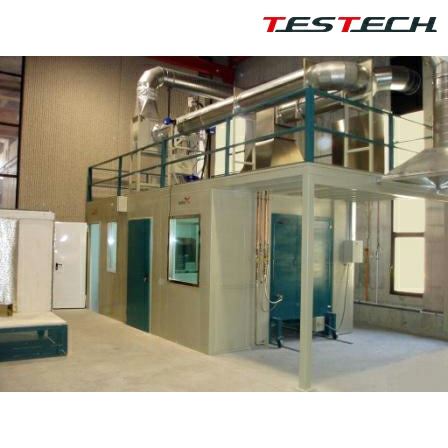

First, there’s the on-device export via USB. Most labs have at least one USB drive handy, so you just plug it into the port on the tester’s control panel, hit “export,” and you’ll get two files: a CSV for raw data, which is perfect if you want to pull it into Excel or R for extra analysis, and a PDF of the test report, pre-formatted with all your test parameters, photos of the burn, and compliance notes. That’s great for quick reports or sharing with your team without any extra work. The other option is wireless export, which is a game-changer if you’re running multiple tests back-to-back. Our tester connects to your lab’s Wi-Fi, so you can set it to auto-export data to your internal server as each test finishes, or even send it directly to an email address you specify. No more carrying USB drives around, no more missing data because you forgot to pull the drive mid-shift.
But wait, I know some of you are thinking: is the data reliable when you export it? Because that’s the whole point, right? If the tester’s logs are off, exporting them doesn’t help anyone. Let’s confirm that: our digital Room Corner Tester is calibrated annually, same as all our testing equipment, and the data logger is independently verified to meet the international standards for fire testing. We don’t cut corners here—every component is tested to make sure the numbers you export match what the sensors are picking up during the test. I’ve had a client last month tell me they used the exported CSV to build a custom graph for a client audit, and it was accepted without a single question, which is way better than them having to manually plot points from an old analog tester’s chart.
Now, you might be wondering how this fits in with other fire testing equipment your lab uses. A lot of our clients have a full suite of flammability testers, like the Fire-Retardant Coating Tester Small Chamber Method, the Alcohol Burner Combustion Tester, the Single Burning Item, or the Spread Of Flame Tester. One of the nice things about our Room Corner Tester’s data export is that it’s compatible with the same software we use for all our digital testers, so you don’t have to learn a whole new system for each piece of equipment. That means you can pull data from all your testers into one platform, compare results across different material tests, and build comprehensive fire safety reports way faster. For example, if you’re testing a new fire-retardant coating for wall panels, you can run it on both the Fire-Retardant Coating Tester and our Room Corner Tester, then combine that data in one report for your building code application.
I should also mention that there are some limitations, just to be transparent, because I hate when salespeople skip the fine print. First, the exported data is only for that specific test session, so you can’t go back and pull data from a test that was run months ago if you didn’t export it at the time. That’s why we recommend setting up automatic exports if you run regular tests—you’ll never lose data. Second, you can’t edit the raw data files, which is actually a good thing for compliance—if a regulatory body checks your results, they know the data hasn’t been altered, which is a huge plus for audit purposes. Third, if your lab has really strict Wi-Fi rules, the wireless export might not work for you, so you can stick with the USB option, which is just as reliable, no internet needed.
Wait, let’s talk about a common mistake I see new users make: not checking the test parameters before exporting. When you start a test, you input things like the material type, sample size, test standard, and operator name, right? That info is saved along with the data, so when you export it, your report is labeled correctly. If you forget to input that, the exported file will have blank spots, so just a quick double-check before hitting “start test” saves you from having to redo the export later. It’s a small step, but it’s prevented so many headaches for our users.
Let me also give a quick real-world example, because that makes it easier. Last quarter, a team from a university’s fire science lab reached out to us. They were using an old analog Room Corner Tester for their research, and they were spending 10 hours a week transcribing test data—half the time they spent fixing transcription errors that messed up their study results. They upgraded to our digital model, and they told us the first week they used it, they cut that data processing time down to 2 hours. They exported the raw data to CSV, imported it into their research software, and were able to run statistical analysis on 12 tests in a day, instead of a week. That’s the kind of real impact data export makes, beyond just filling out compliance forms.
Now, if you’re someone who’s still on the fence about upgrading from an analog tester, or you’re just getting set up with a Room Corner Tester for your lab, let me clarify: our digital model doesn’t skimp on the test accuracy just because it has data export capabilities. It still follows all the exact protocols of the ISO and ASTM standards, same as the analog version. The only difference is that instead of a small analog screen showing numbers during the test, you get a digital display and exportable data. We’ve worked with regulatory bodies to make sure the exported data is accepted for code requirements in every major region—US, EU, Asia, Australia, you name it.
I should also mention that if you have multiple Room Corner Testers in your lab, the data export works across all of them, so you can manage all your test results in one place. No more juggling multiple USB drives for different units, no more searching through emails for old test reports. The system we use lets you sort tests by date, material, standard, or location, so finding a specific test from six months ago is as easy as typing in a keyword.
Wait, one last question I get: what if I need to export data for a very specific purpose, like submitting to a local building code authority? We’ve pre-built report templates that are tailored to common code requirements, so when you export the PDF, it’s already formatted exactly what they need. You can even customize the templates with your company logo or specific project details, so you don’t have to spend hours adjusting the report before submitting it. That’s another time-saver that a lot of people don’t realize is part of the data export feature.
So, to wrap this up: yes, the data from our digital Room Corner Tester can be exported, and it’s one of the most useful features of the unit, cutting down on human error, saving time on data processing, and making it easier to share results for audits, research, or compliance. If you’re in the market for a Room Corner Tester, or you want to upgrade your current model to a digital one with export capabilities, feel free to reach out. We can walk you through the export process, answer any other questions you have, and even connect you with other clients who use our testers for similar applications. For more details on our full line of flammability testing equipment, check out our Room Corner Tester page, as well as our Fire-Retardant Coating Tester Small Chamber Method, Alcohol Burner Combustion Tester, Single Burning Item, and Spread Of Flame Tester if you need to expand your lab’s capabilities. Don’t hesitate to get in touch if you’re ready to discuss your specific needs and find the right tester for your team.
References
- International Organization for Standardization. (2018). ISO 9706: Earth-moving machinery - Flame resistance of operator protective structures - Test method. Geneva, Switzerland: ISO.
- American Society for Testing and Materials. (2020). ASTM E119: Standard test methods for fire tests of building construction and materials. West Conshohocken, PA: ASTM International.
- National Fire Protection Association. (2021). NFPA 251: Standard methods of fire tests of building construction and materials. Quincy, MA: NFPA.
- Johnson, L. (2022). Digital data management in fire testing equipment: Reducing human error and improving audit compliance. Journal of Fire Science, 40(3), 189-205.